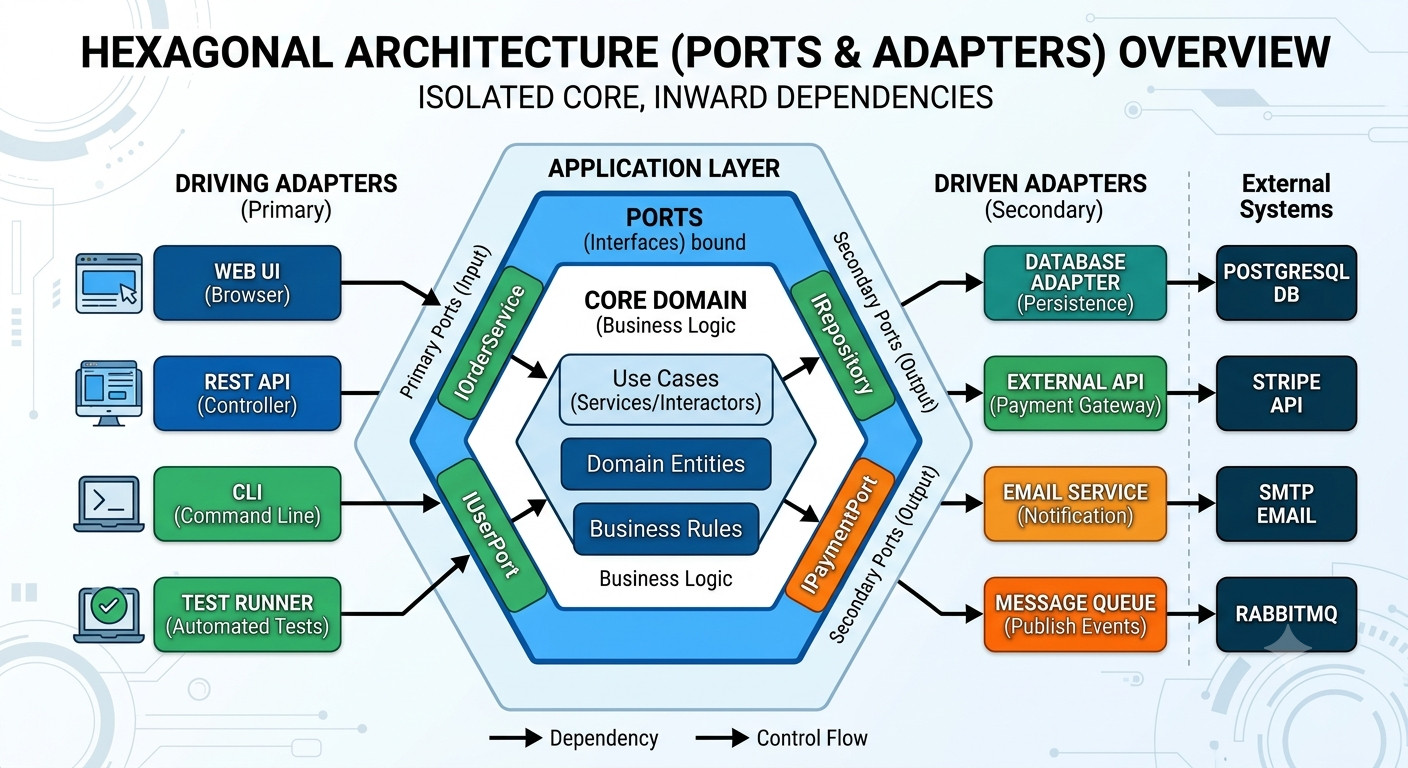
Hexagonal Architecture (Python)

Hexagonal Architecture (also known as Ports and Adapters) is one of the best patterns for keeping your core business logic pure, testable, and completely decoupled from external noise like databases, APIs, or UI frameworks.

To get started, I will explain these core concepts and how they are applied using FastAPI, PostgreSQL, and Pytest.

The core philosophy

The main idea is simple: Your business logic does not care what database or web framework you use. Instead of building your application in traditional database-centric layers, you put your Domain (Business Logic) at the absolute center. Anything outside that core (FastAPI, PostgreSQL, Celery, External APIs) is considered an “external detail.”

Ollama as user systemd service

Sometimes I need a service to run when my user is logged in, otherwise the service can run like the other services when the machine start, systemd can provide that functionality.

Ollama

Ollama is one of the tools that allows you to run large language models locally. There are other tools like Unsloth Studio, llama.cpp, LM Studio, but Ollama is the simplest.

Installation
curl -fsSL https://ollama.com/install.sh | sh

By default, running the installation script will attempt to create a user ollama and systemd unit file to run the service when the machine starts.

Golang Password Generator

I continue learning Go, so this time I created a password generator to generate secure passwords that exclude ambiguous characters

Features

  • Generate multiple passwords at once.
  • Customizable password length (minimum 8 characters).
  • Excludes ambiguous characters (e.g., 0, 1, O, I, l, 5, S, q, g).
  • Memory efficient

Implementation Details

To make the development easy and more maintainable creating a modern CLI tool I use spf13/cobra, Cobra framework and keep the dependencies at minimum with crypto/rand for cryptographically secure random number generation and strings.Builder for efficient string construction.

Switching to i3wm from Gnome

If you like the tiling window manager like i3wm and you want to switch from Gnome there are somethings missing like the network manager applet, the volume control, add/connect bluetooth devices and in some cases the gnome-keyring to handle passwords, private keys and certificates.

To fix that, there are some config tweaks and programs that would make the switch to i3 better. For this i going to use Fedora 34

Timezone lookup using latitude and longitud (part 2)

For the fastapi project we are going to use Sqlalchemy and postgresql taking some reference from the fastapi documentation.

# create a virtualenv, with any tool: poetry, pipenv, virtualenv module, etc 
pip install fastapi uvicorn aiofiles SQLAlchemy psycopg2-binary

project structure

.
├── Dockerfile
├── LICENSE
├── main.py
├── README.md
├── requirements.txt
└── timezone_utils
    ├── database.py
    ├── __init__.py
    ├── models.py
    ├── schemas.py
    └── utils.py

1 directory, 10 files

we define the models, schemas and engine for sqlalchemy and the api in the package timezone_utils

Timezone lookup using latitude and longitude (part 1)

First timezones are evil, but sometimes you need to work with them. Sometimes is easy to consume some third party api to get timezone information based on a given location using geocoding but there also exists some alternatives.

Then inspired on this blog post and the project Timezone boundary builder decided to create a test project using fastapi and postgis to do the timezone lookup using the latitude and longitude.